

Overview
Getting Started
Your connected systems shouldn't have to ask Aircall what happened — they should already know. Webhooks let you listen to Aircall events in real time, so your systems can react the moment something changes: a call ends, a message arrives, an agent misses a call, a user uninstalls your app.
Instead of polling the API, Aircall pushes a POST request to your desired endpoint for each event as it happens. You decide which events to listen to, and what to do with them.
Creating webhooks
There are two ways to create webhooks on an Aircall account.
Any admin can set up a webhook manually from the Aircall Dashboard. This is useful for quick testing, one-off setups or with connector tools such as Zapier or Make. See the Help Center article for step-by-step instructions.
Register a webhook programmatically on a user's account without any manual steps — the recommended approach for technology partners building integrations. See Build event-driven integrations with webhooks or the API Reference for details.
Commonly used call events
For the full list of webhook events, see the API resources.
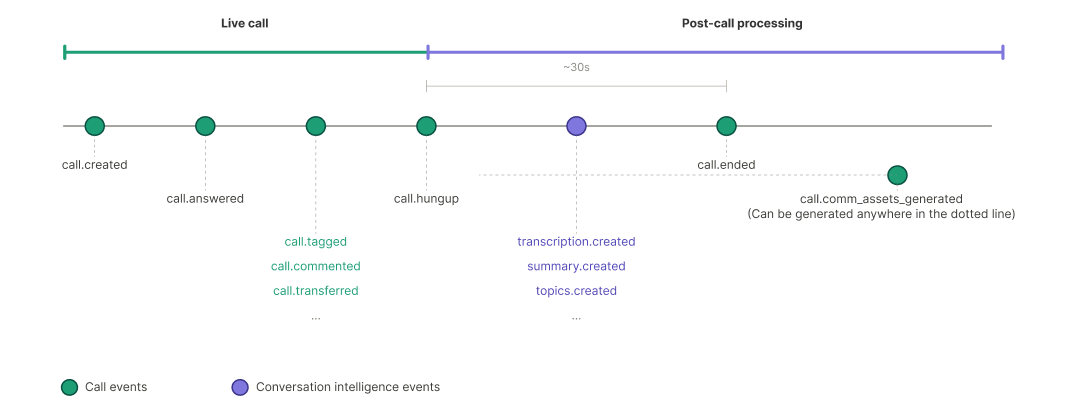
Call events
| Event | When it fires |
|---|---|
call.created | A user or system starts a new inbound or outbound call. |
call.answered | An agent answers an inbound call, or a recipient answers an outbound call. |
call.hungup | Fires immediately when a call ends. Use this event for real-time dashboards and live agent status. |
call.ended | Fires about 30 seconds after a call ends, once Aircall has finalized the call data (duration, recording, and more). Use this event to sync call records. |
call.comm_assets_generated | Fires when recording or voicemail links are ready. Use this event if those assets are not yet available in call.ended. |
call.transferred | An agent transfers a call to another agent or number. |
call.tagged | A user or integration adds a tag to a call. |
Conversation intelligence events
Some of these events may require the AI Assist add-on. See the Conversation Intelligence API reference for details.
| Event | When it fires |
|---|---|
transcription.created | A call transcription is available |
summary.created | A call summary is available |
topics.created | Key topics are available for a call |
action_item.created | AI adds an action item based on ongoing conversation. |
Updated 3 months ago