

Overview
Everything you need to get started building with Aircall calls.
Introduction
The call object is the core of Aircall's API. Every phone interaction — inbound or outbound — generates a call record that captures what happened, who was involved, and when. Most integrations read from it, react to it, or write back to it at some point.
Aircall gives you two ways to work with calls: listen to events as they happen, and act on them via the REST API.
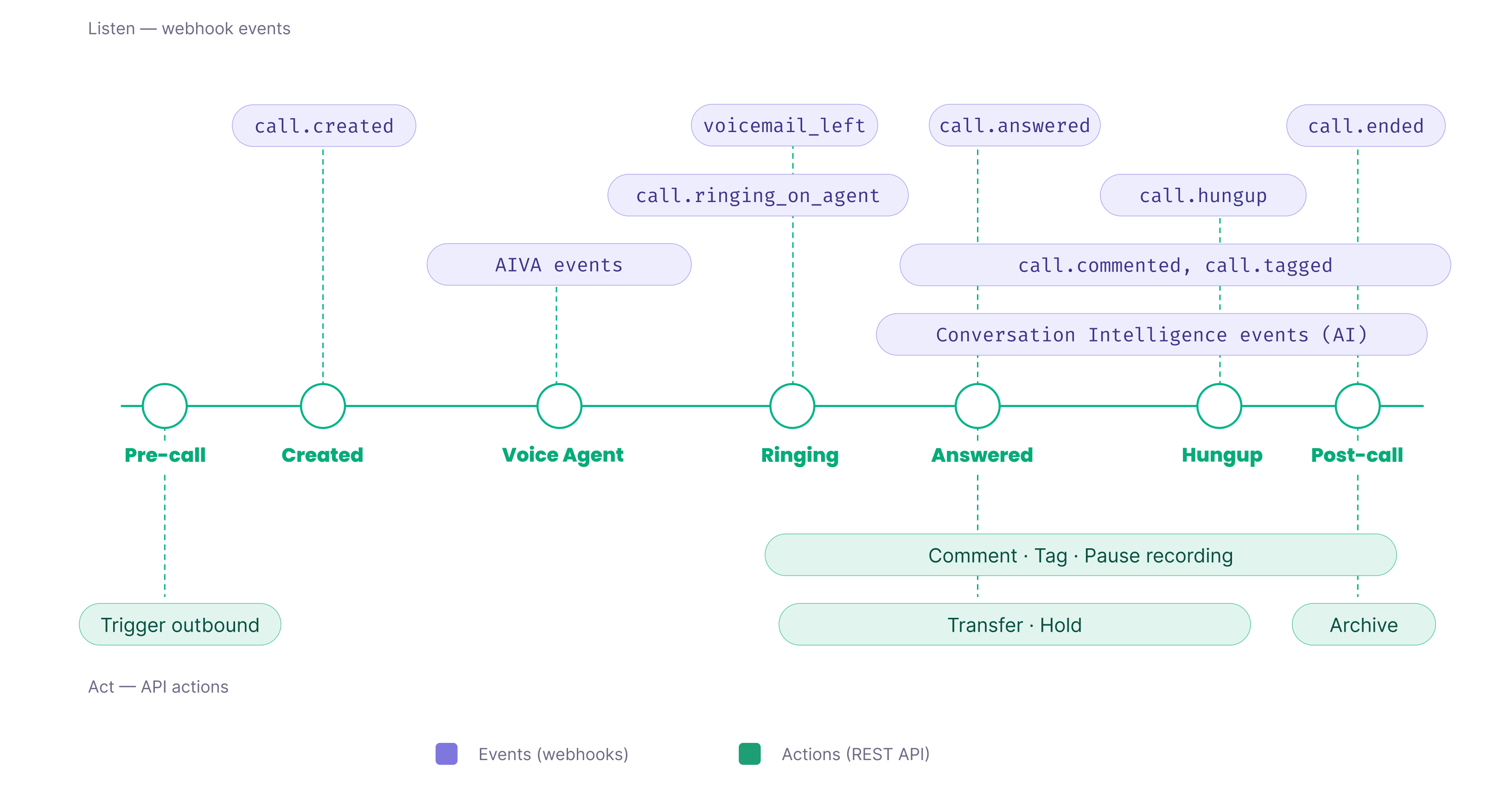
Events are delivered via webhooks and fire at each stage of the call lifecycle — from the moment a call is created through to post-call processing. They carry the call object payload so your integration always has the latest state. AI Voice Agent events and Conversation Intelligence events are also available for integrations that work with Aircall's AI features.
Actions are REST API calls you make to intervene in or enrich a call — triggering an outbound call, transferring, tagging, adding a comment, or archiving a record once the call is done.
The diagram below shows where the most popular events and actions sit across the call lifecycle. For a full list of fields, events and actions see the Calls API reference.
Getting call data
There are two ways to get call data into your integration. Which one you use depends on whether you need to react to calls as they happen or retrieve records on demand.
Aircall pushes a call event to your endpoint each time something happens. Your integration stays in sync without polling, with no rate limit concerns.
Your integration fetches call records on demand using GET /v1/calls. Useful for back-filling historical data or one-off imports.
Common use cases and their events
Aircall fires a webhook event at each stage of the call lifecycle. Subscribe to the events your integration needs when registering a webhook.
| If you want to... | Start with |
|---|---|
| 🗂️ Log or sync a complete call record | call.ended |
| 🎙️ Access recordings, voicemails and transcripts, | call.ended, call.comm_assets |
| 📲 React to incoming calls for routing or screen-pop | call.created, call.ringing_on_agent |
| 📵 Handle missed calls and voicemails | call.agent_declined, call.voicemail_left |
| 🏷️ Sync tags and comments added by agents | call.tagged, call.commented |
| 🎫 Create live tickets or notes in CRMs and Helpdesks | call.created, call.answered |
| 🤖 Access AI generated content (Summaries, topics, action items, QA...) | Conversation intelligence events |
Fields developers ask about the most
The call object has a lot of fields — the API reference covers all of them. These are the ones with non-obvious behaviour that most integration builders run into.
raw_digits | The other party's phone number. For inbound calls this is the caller's number; for outbound it's the number dialed. Use this as your primary lookup key when matching a call to a record in your system — not contact. |
aircall_number | Your customer's Aircall number. The virtual number the call came in on or was made from. Useful for routing records to the right team or workspace in your integration. |
| contact | Populated from Aircall's own contact directory only. It will be null when the contact was synced from an external CRM or helpdesk, and when the caller isn't in the directory at all. Always fall back to raw_digits for lookups. |
| Missed calls | There is no type: "missed" field. A call is missed when status is done and missed_call_reason is populated. The value tells you why — abandoned_in_classic, out_of_opening_hours, short_abandoned, or agents_did_not_answer. |
| Duration vs Talk time | duration includes ring time. It covers the full call lifecycle in seconds. If you need the time the agent was actually on the call, compute it yourself: ended_at − answered_at. Note that answered_at is null for missed or unanswered calls. |
| recording & voicemail | Both are signed URLs to an MP3 file. These URLs have expiry rules — check the API reference for details. |
| Transcripts & AI artifacts | Not part of the call object. Transcripts, summaries, and other AI-generated content are delivered separately. Your integration needs to subscribe to conversation intelligence objects to access them. See the conversation intelligence guide. |
Popular guides
Updated 3 months ago