

Overview
The Analytics API exposes Aircall's reporting data through the public API as asynchronous CSV exports. You request a report for a date range, Aircall generates it in the background, and you download the finished file. Every export is scoped to your own company.
It's built for historical, reporting-grade data — feeding a BI dashboard, backfilling a warehouse, or powering analytics inside your own product.
Analytics+ required. An Aircall account with the Analytics+ add-on enabled is required for this section.
How it works
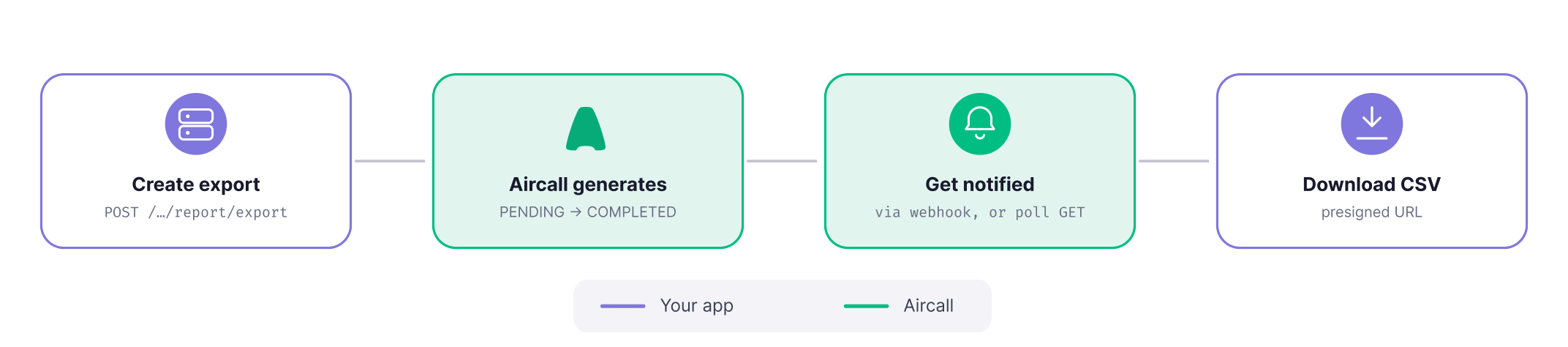
Exports run asynchronously. You submit a job, Aircall generates the report in the background, and you collect the finished CSV from a presigned URL. The job moves through different status: PENDING → COMPLETED (or FAILED), and end-to-end completion typically takes seconds to a few minutes.
There are two ways to learn a job is done — a webhook (recommended) or polling the retrieve endpoint. More on this on the Build your own reports guide.
What data can you export?
Each export is one report type, scoped by a date range. The report type determines the columns in the CSV.
Twelve report types are supported across three families; the calls history report is the most common starting point.
When the call happened, its direction, the numbers involved, the team who handled it, how long it lasted, whether it was answered or missed, and so on.
Raw user-status events (e.g.: Available, After-Call Work, Paused, Offline, …) with timestamps.
Ten per-user activity breakdowns — for example calls handled, ringing attempts, call volume and time, and after-call work time.
The available filters are the same regardless of report type; only the resulting columns differ. For the authoritative list of report types, filters, and each report's columns, see the Analytics API reference.
Common use cases
| Use case | What you can do |
|---|---|
| 📊 BI dashboards & reporting | Export CALLS_HISTORY or a user-activity report on a schedule and load it into your BI tool. |
| 👨💻 Agent activity monitoring | Track availability, after-call work, and calls handled per user with the USER_ACTIVITY_* reports. |
| 📤 Recurring exports | Automate a recurring export (for example, nightly) and collect each file as the job completes. |
Supporting endpoints
The export flow runs on two endpoints — create an export and retrieve it.
| Capability | Description |
|---|---|
Create exportPOST /v1/analytics/report/export | Submit an export job for a report type and date range. Returns an exportID and status: PENDING. API reference → |
Retrieve exportGET /v1/analytics/report/export/:export_id | Check a job's status. Once COMPLETED, the response includes a presigned downloadUrl. API reference → |
Updated 3 months ago