

Send messages: Skipping-inbox
Use the Aircall Public API to send WhatsApp text, template, and media messages
Overview
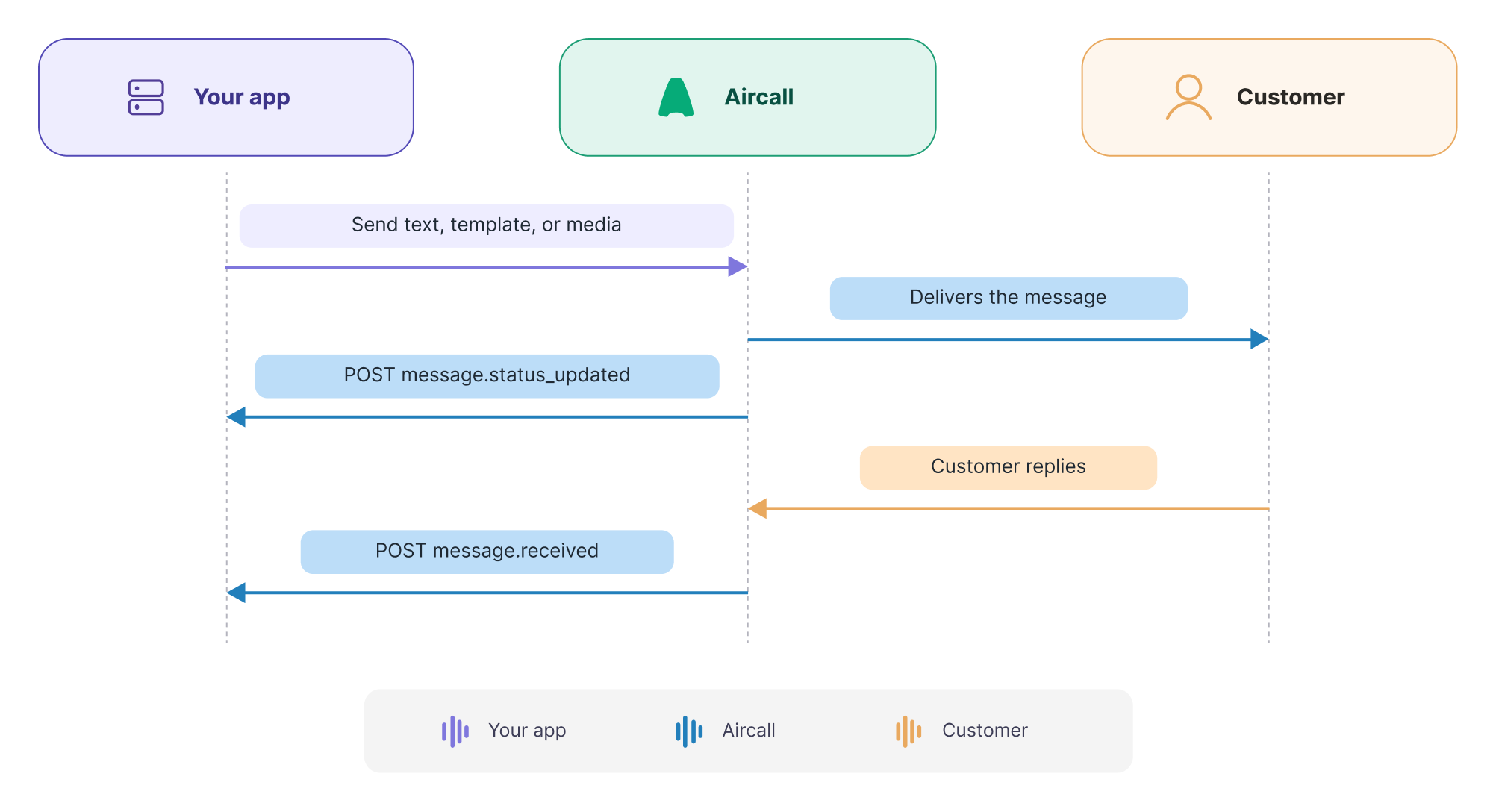
Skipping-inbox mode sends WhatsApp messages straight to the customer without an agent inbox. Your messages stay outside Aircall Workspace, so your integration owns the conversation end to end.
Aircall sends inbound replies and delivery-status updates to the callbackUrl you configure on the line. Use this mode for automated, high-volume, or non-conversational messaging, such as order updates, alerts, and reminders.
When a human agent needs to see and continue the thread, use agent conversation mode instead.
Prerequisites
- A registered WhatsApp-capable number — See the WhatsApp overview for registration.
- A valid OAuth access token — See OAuth page to learn how to get one.
- A publicly reachable HTTPS
callbackUrlto receive replies and delivery-status updates.
Configure the line
Skipping-inbox mode requires a one-time line configuration. Configure the line with type: "whatsapp".
import 'dotenv/config';

const LINE_ID = 123; //Your Aircall number with active WhatsApp Addon

const configureLine = async () => {
  const res = await fetch(
    `https://api.aircall.io/v1/numbers/${LINE_ID}/messages/configuration`,
    {
      method: 'POST',
      headers: {
        'Authorization': `Bearer ${process.env.AIRCALL_ACCESS_TOKEN}`,
        'Content-Type': 'application/json'
      },
      body: JSON.stringify({
        callbackUrl: 'https://your-app.example.com/aircall/whatsapp',
        type: 'whatsapp'
      })
    }
  );

  if (!res.ok) throw new Error(`Failed to configure line: ${res.status}`);

  const { token } = await res.json();
  // Store the token against your line record. It identifies the Aircall
  // account on incoming callbacks
  return token
}
The response returns a token and confirms the line as WhatsApp Public API. Once configured, the line no longer sends or receives WhatsApp through the Aircall workspace — all traffic flows through the API and your callbackUrl.
Send a template message
Templates are pre-approved message formats. Use one to start a conversation or to reach a customer outside the 24-hour window.
Get the templates
First, list the line's approved templates to find the template you need to send.
const LINE_ID = 123; //Your Aircall number with active WhatsApp Addon

const listApprovedTemplates = async () => {
  const res = await fetch(
    `https://api.aircall.io/v1/numbers/${LINE_ID}/templates?status=APPROVED`,
    { headers: { 'Authorization': `Bearer ${process.env.AIRCALL_ACCESS_TOKEN}` } }
  );

  if (!res.ok) throw new Error(`Failed to list templates: ${res.status}`);

  const { templates } = await res.json();
  return templates
}
Send the template
Send the template by passing templateParams instead of text. The body array fills the template's variables, matching each placeholder key to a value.
const sendWhatsAppTemplate = async () => {
  const res = await fetch('https://api.aircall.io/v1/messages/whatsapp/send', {
    method: 'POST',
    headers: {
      'Authorization': `Bearer ${process.env.AIRCALL_ACCESS_TOKEN}`,
      'Content-Type': 'application/json'
    },
    body: JSON.stringify({
      lineId: 123,
      to: '+14155552671',
      templateParams: {
        id: '1234',
        body: [
          { key: '{{1}}', value: 'Jordan' },
          { key: '{{2}}', value: '2026-06-18' }
        ]
      }
    })
  });

  if (!res.ok) throw new Error(`Send failed: ${res.status}`);
  return res.json()
}Each key in body must match a variable configured for that template in Aircall. You define those variables under the number's Integration page, specifically, in the WhatsApp in Aircall section; they correspond to the template's placeholders (
{{1}},{{2}}, ...). Set each key to the same variable so its value lands in the right placeholder.
Send a text message
Free-form text is allowed while the 24-hour customer service window is open — that is, within 24 hours of the customer's last inbound message. The two modes use different endpoints and name the recipient differently: agent conversation uses externalNumber, skipping-inbox uses to. Both carry lineId in the request body.
const sendWhatsAppMessage = async () => {
  const res = await fetch('https://api.aircall.io/v1/messages/whatsapp/send', {
    method: 'POST',
    headers: {
      'Authorization': `Bearer ${process.env.AIRCALL_ACCESS_TOKEN}`,
      'Content-Type': 'application/json'
    },
    body: JSON.stringify({
      lineId: 123,
      to: '+14155552671',
      text: 'Thanks for reaching out — an agent will follow up shortly.'
    })
  });

  if (!res.ok) throw new Error(`Send failed: ${res.status}`);
  return res.json()
}Outside the window, free-form is rejected. When more than 24 hours have passed since the customer's last reply, a text or media send fails. Send an approved template instead, or queue the message until the customer messages again.
Send media
Media sends are supported only on the skipping-inbox mode. Pass a single publicly reachable mediaUrl.
const sendMedia = async () => {
  const res = await fetch('https://api.aircall.io/v1/messages/whatsapp/send', {
    method: 'POST',
    headers: {
      'Authorization': `Bearer ${process.env.AIRCALL_ACCESS_TOKEN}`,
      'Content-Type': 'application/json'
    },
    body: JSON.stringify({
      lineId: 123,
      to: '+14155552671',
      mediaUrl: 'https://your-app.example.com/receipts/4821.pdf'
    })
  });

  if (!res.ok) throw new Error(`Send failed: ${res.status}`);
  return res.json()
};Host the file where Aircall can fetch it.
mediaUrlmust resolve to a publicly accessible file over HTTPS. Aircall retrieves it at send time. URLs behind authentication or on a private network are not accessible to Aircall, so the message cannot include the media.
Response codes
These codes apply to all messaging endpoints.
| Status code | What it means |
|---|---|
| 200 | Request accepted. |
| 403 | Line is not configured or WhatsApp add-on is inactive. |
| 404 | The template is not found. Re-list the line's templates and confirm the id is still APPROVED. |
| 429 | Rate limit exceeded |
See the full list of response codes here.
Updated about 13 hours ago