

Send and receive SMS in proxy mode
Configure an Aircall number for programmatic messaging, send SMS, MMS, and group messages from your integration, and handle inbound messages and delivery status.
Do you really need proxy mode?Using proxy mode is not the default recommended use case and it impacts the user experience. We recommend whenever possible using in Agent conversatoin endpoints for simplicity and better user experience.
Getting Started
In this guide you'll build an integration that sends SMS and MMS messages programmatically from an Aircall number — no agent interaction required. You'll configure the number for API messaging, send outbound messages, and set up a callback endpoint to receive inbound replies and track delivery status in your own system.
Before writing any code, have the following prepared:
- You must have an Aircall account. Sign up as a customer here or if you qualify to be a tech partner you can then sign up for a developer account here.
- The account must have numbers set up for SMS.
For eligibility requirements, pricing, number registration, and regional restrictions, see the Aircall Help Center. - An access token taken from the OAuth guide — or Basic auth
- The ID of the SMS-configured Aircall number you want to send from — retrieve it via
GET /v1/numbersor from the Dashboard. - A publicly accessible HTTPS endpoint to receive webhook events
Walkthrough
Flow overview
Before a number can send messages via the API, it needs to be configured with a callback URL. This is a one-time admin step that tells Aircall where to deliver inbound messages and delivery status events for that number. Once configured, your integration can send messages at any time using that number.
Sending and receiving messages are decoupled: you push outbound messages via the REST API, and Aircall pushes inbound messages and status updates to your callback URL asynchronously.
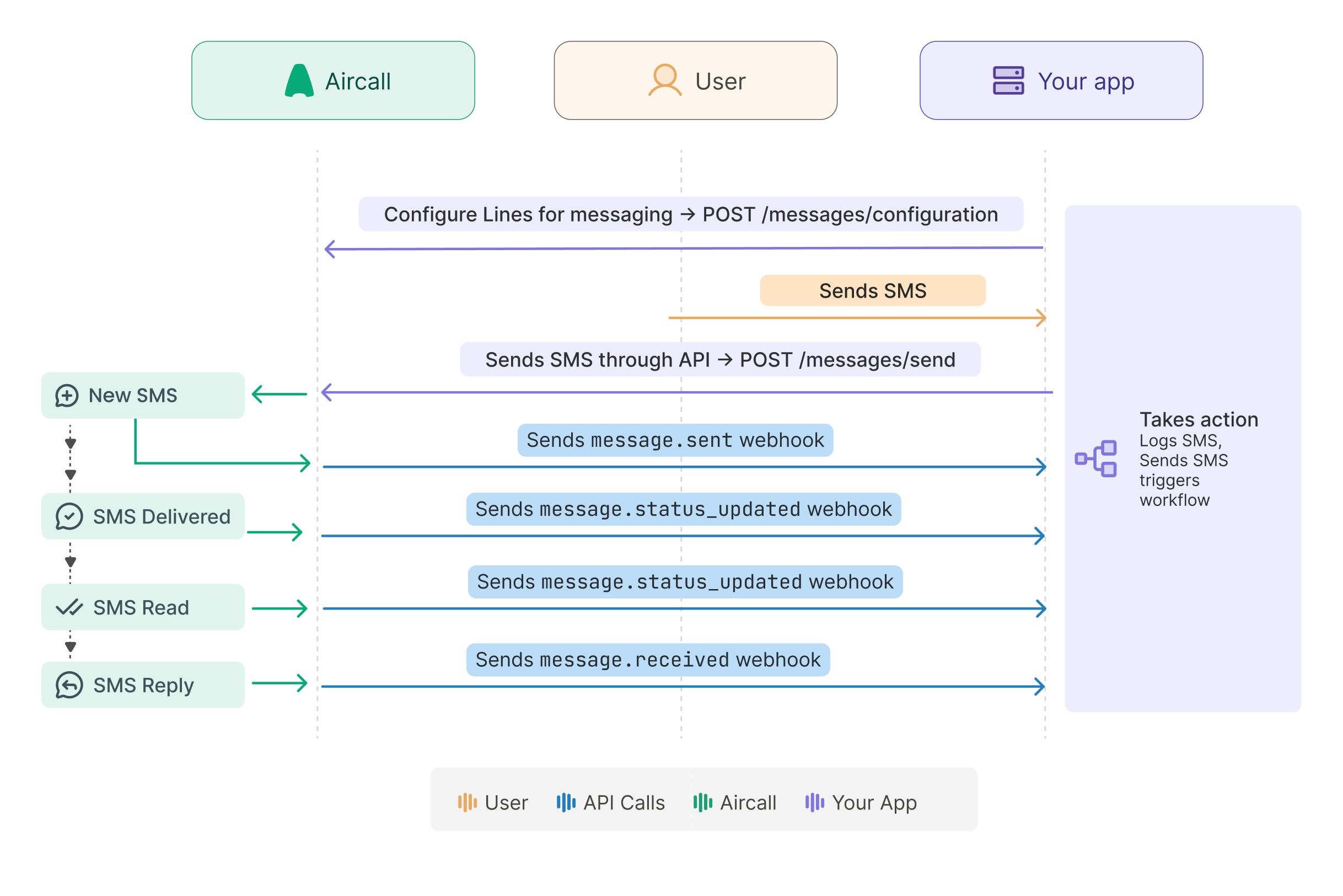
Configure a number
Register a callback URL against the number using POST /v1/numbers/:id/messages/configuration. Aircall will deliver all inbound messages and status updates to this URL.
Configuring a number for proxy SMS, hides it from the Aircall app.
Once configured for API messaging, agents can no longer send or receive messages for that number through the Aircall app. To restore in-app messaging, delete the configuration.
const configurePublicApiNumber = async (lineId, callbackUrl) => {
    const ACCESS_TOKEN = process.env.ACCESS_TOKEN;
    const url = `https://api.aircall.io/v1/numbers/${lineId}/messages/configuration`;

    try {
        const response = await fetch(url, {
            method: 'POST',
            headers: {
                'Content-Type': 'application/json',
                'Authorization': 'Bearer ' + ACCESS_TOKEN
            },
            body: JSON.stringify({ callbackUrl })
        });

        const payload = await response.json();

        if (response.ok) {
            console.log('Number configured successfully:', payload);
        } else {
            console.error('Failed to configure number:', response.status, payload);
        }
    } catch (error) {
        console.error('Error configuring number:', error.message);
    }
};

module.exports = { configurePublicApiNumber };
You can inspect or remove the configuration at any time using GET and DELETE on the same path:
require('dotenv').config();

const configUrl = (numberId) =>
  `https://api.aircall.io/v1/numbers/${numberId}/messages/configuration`;

// Fetch the current configuration
const getConfig = (numberId) =>
  fetch(configUrl(numberId), {
    headers: { 'Authorization': 'Bearer ' + accessToken }
  }).then(r => r.json());

// Remove the configuration — restores in-app messaging for this number
const deleteConfig = (numberId) =>
  fetch(configUrl(numberId), {
    method: 'DELETE',
    headers: { 'Authorization': 'Bearer ' + accessToken }
  });
Send SMS & MMS
Once a number is configured, you can send messages using POST /v1/numbers/:id/messages/send. The response returns immediately with status: "pending" — actual delivery is asynchronous. It echoes any media URLs you submitted as media_url.
See an example of how to send SMS and MMS:
async function sendMessage(numberId, payload) {
    const ACCESS_TOKEN = process.env.ACCESS_TOKEN;

    const response = await fetch(`https://api.aircall.io/v1/numbers/${numberId}/messages/send`, {
        method: 'POST',
        headers: {
            'Authorization': `Bearer ${ACCESS_TOKEN}`,
            'Content-Type': 'application/json'
        },
        body: JSON.stringify(payload)
    });

    if (!response.ok) {
        console.error(`Failed to send message: ${JSON.stringify(await response.text())}`);
    }

    return response.ok;
}

module.exports = { sendMessage };
Send SMS
Pass the destination number in E.164 format and your message text in body
await sendMessage(1234567, {
  to: '+14155552671',
  body: 'Your order #1042 has shipped. Track it at example.com/track/1042'
});
Send MMS
Add a mediaUrl array of publicly accessible file URLs. body is optional for MMS.
await sendMessage(1234567, {
  to: '+14155552671',
  body: 'Your invoice is attached.',
  mediaUrl: ['https://your-app.example.com/invoices/1042.pdf']
});
Send Group SMS/MMS
To send a message to multiple recipients, use POST /v1/numbers/:id/messages/send_group. Pass an array of destination numbers in to. MMS is also supported on this endpoint.
const sendGroupMessage = async (numberId, payload) => {
  const ACCESS_TOKEN = process.env.ACCESS_TOKEN;

  const res = await fetch(
    `https://api.aircall.io/v1/numbers/${numberId}/messages/send_group`,
    {
      method: 'POST',
      headers: {
        'Authorization': `Bearer ${ACCESS_TOKEN}`,
        'Content-Type': 'application/json'
      },
      body: JSON.stringify(payload)
    }
  );
  if (!res.ok) throw new Error(`Aircall API error: ${res.status}`);
  return res.json();
};

module.exports = { sendGroupMessage };
And you can use the sendGroupMessage function like below:
await sendGroupMessage(1234567, {
  to: ['+14155552671', '+14155559842', '+14155553301'],
  body: 'Reminder: your appointment is tomorrow at 10am.'
});
Handling delivery statuses
When a contact replies, Aircall sends a POST request to the callback URL you registered during configuration. Return 200 immediately and handle the payload asynchronously to avoid timeouts.
app.post('/aircall/messages', (req, res) => {
  // Respond immediately — process asynchronously.
  res.sendStatus(200);

  const { event_name, data } = req.body;
  handleMessageEvent(event_name, data).catch(console.error);
});

const handleMessageEvent = async (eventName, messageData) => {
  switch (eventName) {
    case 'message.sent':
      // Outbound message dispatched — record it in your system.
      await upsertMessage(messageData);
      break;

    case 'message.received':
      // Inbound reply — insert or update using data.id as the key.
      await upsertMessage(messageData);
      break;

    case 'message.status_updated':
      // Delivery status changed — update your record (e.g. pending → delivered).
      await updateMessageStatus(messageData.id, messageData.status);
      break;

    default:
      console.log('Unhandled event:', eventName);
  }
};Messages sent via this endpoint are not recorded in Aircall.
Sent and received messages do not appear in the Aircall app or in Aircall webhooks. Your system is the only place they're stored — persist them in your own database.
Response codes
These codes apply to all messaging endpoints.
| Status code | What it means |
|---|---|
200 | Request accepted. For send endpoints, delivery is asynchronous — initial status is pending. |
201 | Configuration created successfully. |
400 | Invalid request — malformed phone number, missing required field, or unsupported combination (e.g. body and mediaUrl together in a group message). |
Learn about all of the status codes in the API references
Updated about 12 hours ago