

Build an agent activity dashboard
Combine a REST API snapshot with webhook-driven updates to track agent availability and call KPIs in real time
What we’re building
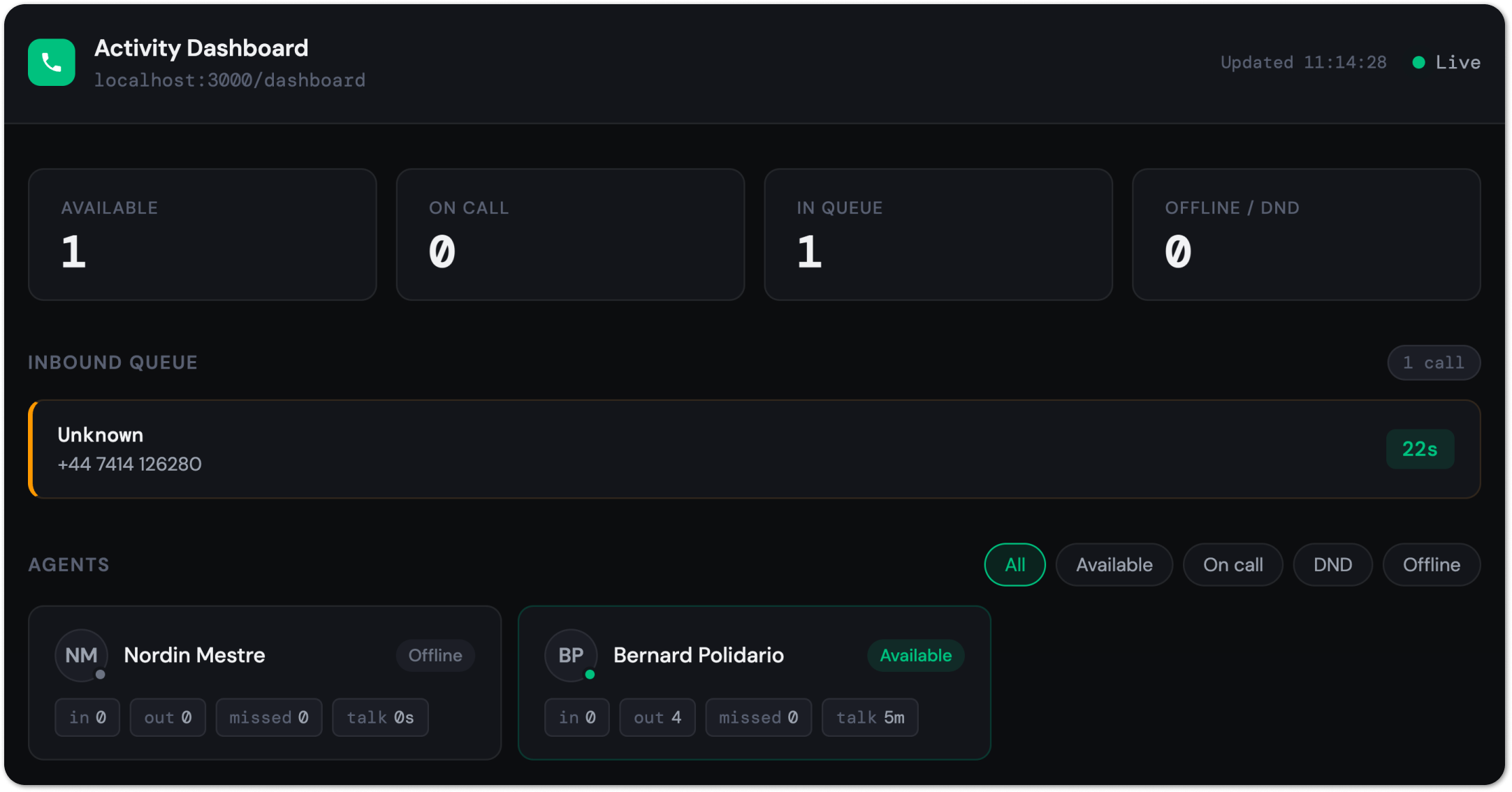
By the end of this guide you'll have a working Node.js backend that exposes a single /dashboard endpoint. That endpoint returns a real-time snapshot of every agent in your Aircall account — their current availability, any live call they're on, and their call metrics for the past hour.
Below is an example of what you can build with this guide.
Prerequisites
- An Aircall account with API access enabled and at least one active phone number
- An API ID and API token — find these in Dashboard → Integrations → API Keys
- A publicly accessible HTTPS endpoint to receive webhook events. If you don’t have yet, set up your webhooks first here.
Fetch agent availability
The GET /v1/users endpoint returns all users in your Aircall account, including their current availability status. This is your starting point — call it on application start to build an initial snapshot of who is online, on a call, or unavailable.
List users and their status
Each user object includes an availability field that reflects their current state. or the full list of values and the complete user object schema, see the Users API reference.
require('dotenv').config();

const BASE = 'https://api.aircall.io/v1';
const credentials = Buffer.from(
  `${process.env.AIRCALL_API_ID}:${process.env.AIRCALL_API_TOKEN}`
).toString('base64');

const headers = {
  'Authorization': `Basic ${credentials}`,
  'Content-Type': 'application/json'
};

/**
 * Returns all users with their current availability status.
 * Iterates through all pages automatically.
 */
const fetchUsers = async () => {
  let url = `${BASE}/users?per_page=50`;
  let users = [];

  while (url) {
    const res  = await fetch(url, { headers });
    if (!res.ok) throw new Error(`Aircall API error: ${res.status}`);
    const data = await res.json();
    users.push(...data.users);
    url = data.meta?.next_page_link || null;
  }

  return users;
};

// Each user object looks like:
// {
//   id: 12345,
//   name: "Alice Martin",
//   email: "[email protected]",
//   availability: "available",  // see table above
//   live_call: null             // populated when on_call
// }
Live call detailsWhen a user's availability is on_call, their object includes a live_call sub-object with the call direction, the external phone number, and the current duration. Use this to display real-time call context next to the agent's status.
Group users by team
To display agents organised by team — the most common layout for a supervisor view — fetch teams separately and join them to your user data.
/**
 * Returns a map of { teamId: { name, users: [...] } }
 * ready to drive a grouped dashboard view.
 */
const fetchTeamsWithUsers = async () => {
  const [teamsRes, users] = await Promise.all([
    fetch(`${BASE}/teams`, { headers }).then((r) => r.json()),
    fetchUsers()
  ]);

  const userMap = Object.fromEntries(
    users.map((u) => [u.id, u])
  );

  return teamsRes.teams.reduce((acc, team) => {
    acc[team.id] = {
      name: team.name,
      users: (team.users || []).map((u) => userMap[u.id]).filter(Boolean)
    };
    return acc;
  }, {});
};

// Result shape:
// {
//   789: {
//     name: "Support Team",
//     users: [
//       { id: 12345, name: "Alice", availability: "available", ... },
//       { id: 67890, name: "Bob",   availability: "on_call",   ... }
//     ]
//   }
// }
Team membership is relatively staticFetching teams on every refresh is wasteful. Cache the team structure and refresh it on a longer interval — every few hours is typically sufficient. Availability status, on the other hand, needs to stay current.
Build agent call metrics
Use GET /v1/calls to pull call records for a time window and aggregate them by agent. This gives you the historical view — inbound and outbound totals, missed calls, talk time — that complements the live availability snapshot.
Fetch calls for a time window
Pass from and to as Unix timestamps to scope results to your activity period. For a live dashboard, a rolling window — like the last 30 or 60 minutes — is usually more useful than a fixed period.
/**
 * Fetches calls within a rolling time window.
 *
 * @param {number} windowMinutes  How far back to look (default: 60)
 * @returns {Promise<Array>}
 */
const fetchRecentCalls = async (windowMinutes = 60) => {
  const now  = Math.floor(Date.now() / 1000);
  const from = now - windowMinutes * 60;

  let url = `${BASE}/calls?from=${from}&to=${now}&per_page=50&order=desc`;
  let calls = [];

  while (url) {
    const res  = await fetch(url, { headers });
    if (!res.ok) throw new Error(`Aircall API error: ${res.status}`);
    const data = await res.json();
    calls.push(...data.calls);
    url = data.meta?.next_page_link || null;
  }

  return calls;
};
Aggregate per-agent metrics
Once you have the calls, aggregate them per user. Aircall relates calls to the agent who handled them via the user field on each call object.
/**
 * Groups calls by agent and calculates per-agent KPIs.
 *
 * Returns a map of { userId: { inbound, outbound, missed, totalTalkSeconds } }
 */
const aggregateByAgent = (calls) => {
  return calls.reduce((acc, call) => {
    const userId = call.user?.id;
    if (!userId) return acc; // skip calls not assigned to a user

    if (!acc[userId]) {
      acc[userId] = { inbound: 0, outbound: 0, missed: 0, totalTalkSeconds: 0 };
    }

    const m = acc[userId];

    if (call.direction === 'inbound')  m.inbound++;
    if (call.direction === 'outbound') m.outbound++;

    // A call is missed when status is "done" and missed_call_reason is set
    if (call.status === 'done' && call.missed_call_reason != null) {
      m.missed++;
    }

    // Talk time: time from answer to end (null for unanswered calls)
    if (call.answered_at && call.ended_at) {
      m.totalTalkSeconds += call.ended_at - call.answered_at;
    }

    return acc;
  }, {});
};

// Example output:
// {
//   12345: { inbound: 8, outbound: 2, missed: 1, totalTalkSeconds: 3240 },
//   67890: { inbound: 5, outbound: 4, missed: 0, totalTalkSeconds: 2100 }
// }
Missed calls and user assignment.Aircall relates missed calls to the phone number, not the user who could have answered. This aggregation attributes a missed call to the user associated with the call object, if one exists. For a more complete picture, you may want to supplement this with phone number–to–user mappings from
GET /v1/numbers.
Keep the dashboard live with webhooks
Polling GET /v1/users on a short interval works for low-frequency updates, but webhooks give you immediate state changes without the overhead. Subscribe to call lifecycle events and update your in-memory state as each one arrives.
Subscribe to call events
Register a webhook with the events that drive availability changes and queue state. You don't need all call events — just the ones that transition an agent's status or signal a call entering or leaving the queue.
require('dotenv').config();

const registerWebhook = async () => {
  const webhookUrl = process.env.WEBHOOK_URL;
  if (!webhookUrl) {
    throw new Error('WEBHOOK_URL is not set in your .env file.');
  }

  const credentials = Buffer.from(
    `${process.env.AIRCALL_API_ID}:${process.env.AIRCALL_API_TOKEN}`
  ).toString('base64');

  const res = await fetch('https://api.aircall.io/v1/webhooks', {
    method: 'POST',
    headers: {
      'Authorization': `Basic ${credentials}`,
      'Content-Type': 'application/json'
    },
    body: JSON.stringify({
      custom_name: 'activity-dashboard',
      url: webhookUrl,
      events: [
        'call.created',   // new call enters the queue
        'call.answered',  // agent picks up — user transitions to on_call
        'call.hungup',    // caller hangs up before being answered
        'call.ended'      // call finishes — user transitions out of on_call
      ]
    })
  });

  if (!res.ok) {
    const body = await res.text();
    throw new Error(`Failed to register webhook: ${res.status} — ${body}`);
  }

  const { webhook } = await res.json();
  console.log('✓ Webhook registered successfully');
  console.log(`  ID:    ${webhook.id}`);
  console.log(`  URL:   ${webhook.url}`);
  console.log(`  Token: ${webhook.token}`);
};

registerWebhook().catch((err) => {
  console.error('Error:', err.message);
  process.exit(1);
});
Then, run this script to register the webhooks:
node register-webhook.jsHandle events and update state
Respond with 200 immediately, then process the event asynchronously. For each event, update your in-memory state rather than re-fetching from the API.
const express = require('express');
const app = express();
app.use(express.json());

// In-memory state — seeded from the REST API on startup (see next section)
let state = {
  users: {},   // { [userId]: { ...userObject } }
  queue: {},   // { [callId]: { ...callObject } } — calls awaiting answer
  metrics: {}  // { [userId]: { inbound, outbound, missed, totalTalkSeconds } }
};

app.post('/webhooks/aircall', (req, res) => {
  res.sendStatus(200); // respond immediately

  const { event, data } = req.body;
  handleEvent(event, data).catch(console.error);
});

const handleEvent = async (event, call) => {
  switch (event) {

    case 'call.created':
      // New inbound call — add it to the queue
      if (call.direction === 'inbound') {
        state.queue[call.id] = { ...call, queuedAt: Date.now() };
      }
      break;

    case 'call.answered':
      // Call picked up — remove from queue, mark agent as on_call
      delete state.queue[call.id];
      if (call.user?.id) {
        state.users[call.user.id] = {
          ...state.users[call.user.id],
          availability: 'on_call',
          live_call: call
        };
      }
      break;

    case 'call.hungup':
      // Caller hung up before answer — remove from queue, count as missed
      delete state.queue[call.id];
      break;

    case 'call.ended': {
      // Call finished — update metrics and clear agent's on_call state
      const userId = call.user?.id;
      if (userId) {
        incrementMetrics(userId, call);
        state.users[userId] = {
          ...state.users[userId],
          availability: 'available', // approximate — re-sync to confirm
          live_call: null
        };
      }
      break;
    }
  }
};

const incrementMetrics = (userId, call) => {
  if (!state.metrics[userId]) {
    state.metrics[userId] = { inbound: 0, outbound: 0, missed: 0, totalTalkSeconds: 0 };
  }
  const m = state.metrics[userId];
  if (call.direction === 'inbound')  m.inbound++;
  if (call.direction === 'outbound') m.outbound++;
  if (call.missed_call_reason != null) m.missed++;
  if (call.answered_at && call.ended_at) {
    m.totalTalkSeconds += call.ended_at - call.answered_at;
  }
};
Approximate availability after call.endedWhen a call ends, the agent may enter wrap-up time before returning to available. Setting availability optimistically to available on call.ended is a reasonable default — but if accuracy matters, re-fetch that user from GET /v1/users/:id a few seconds after the event to confirm their actual status.
Putting it together
The full pattern: seed state from the REST API on startup, then keep it current with webhooks. Expose a /dashboard endpoint that returns the current snapshot for your frontend to render.
require('dotenv').config();
const express  = require('express');
const { aggregateByAgent, fetchUsers, fetchRecentCalls } = require('./get-agents-activity.js');

const app = express();
app.use(express.json());

let state = { users: {}, queue: {}, metrics: {} };

// --- Startup: seed from REST API ---
const bootstrap = async () => {
  const [users, calls] = await Promise.all([
    fetchUsers(),
    fetchRecentCalls(60)  // last 60 minutes
  ]);

  state.users   = Object.fromEntries(users.map((u) => [u.id, u]));
  state.metrics = aggregateByAgent(calls);

  console.log(`Seeded ${users.length} users, ${calls.length} calls`);
};

// --- Periodic re-sync (every 5 minutes) ---
// Catches any availability changes that webhooks may have missed
const periodicSync = async () => {
  const users = await fetchUsers();
  users.forEach((u) => {
    state.users[u.id] = { ...state.users[u.id], ...u };
  });
};
setInterval(periodicSync, 5 * 60 * 1000);

// --- Dashboard endpoint ---
app.get('/dashboard', (_req, res) => {
  res.json({
    users: Object.values(state.users).map((u) => ({
      id:           u.id,
      name:         u.name,
      availability: u.availability,
      live_call:    u.live_call || null,
      metrics:      state.metrics[u.id] || { inbound: 0, outbound: 0, missed: 0, totalTalkSeconds: 0 }
    })),
    queue: Object.values(state.queue).map((c) => ({
      id:        c.id,
      number:    c.number,
      from:      c.number_digits,
      waitingSec: Math.floor((Date.now() - c.queuedAt) / 1000)
    }))
  });
});

// --- Webhook endpoint (from webhook-handler.js) ---
app.post('/webhooks/aircall', (req, res) => {
  res.sendStatus(200);
  const { event, data } = req.body;
  handleEvent(event, data).catch(console.error);
});

bootstrap().then(() => app.listen(3000));
Updated 4 months ago